Let Claude read your notes: Anytype × MCP Second Brain Getting Started Guide for Office Workers
 *▲ When Claude really understands your notes, an office worker’s daily work can become very different. *
A while ago, I wrote an article to share how to connect Claude and Anytype through MCP to create a second brain that will respond to you. That article caused a lot of responses in the community, but I also received many private messages from readers - most of them are office workers who are chased by meetings, reports and messages every day. They have never used Anytype. Just seeing the words “MCP” and “API key” made them retreat.
I totally understand that feeling. Therefore, I am going to put my stance a little lower in this article: assuming that you are a complete newbie and have never even seen what the Anytype icon looks like. I will take you step by step to install this system, and then tell you how different an office worker’s daily work can become when Claude can really read your notes.
Before taking action, understand three things first
I don’t like having people follow instructions without knowing what’s going on. So before opening the terminal, I want to explain three key concepts clearly in the most vernacular way. Once you understand why, you will be more confident in what to do next.
**First, what exactly is Anytype? ** You can first think of it as a note-taking software, but the biggest difference between it and Evernote and Notion lies in two words - local. Your notes are stored on your computer by default and are encrypted; unlike most cloud tools, which put your data on someone else’s server. This is important for professionals who frequently deal with customer data, internal confidentiality or personal privacy. In addition, Anytype adopts an object-oriented design: every note, every project or every contact is an object that can be linked to each other. This makes it more than just a copying book, but more like a personal database that can be queried and connected.
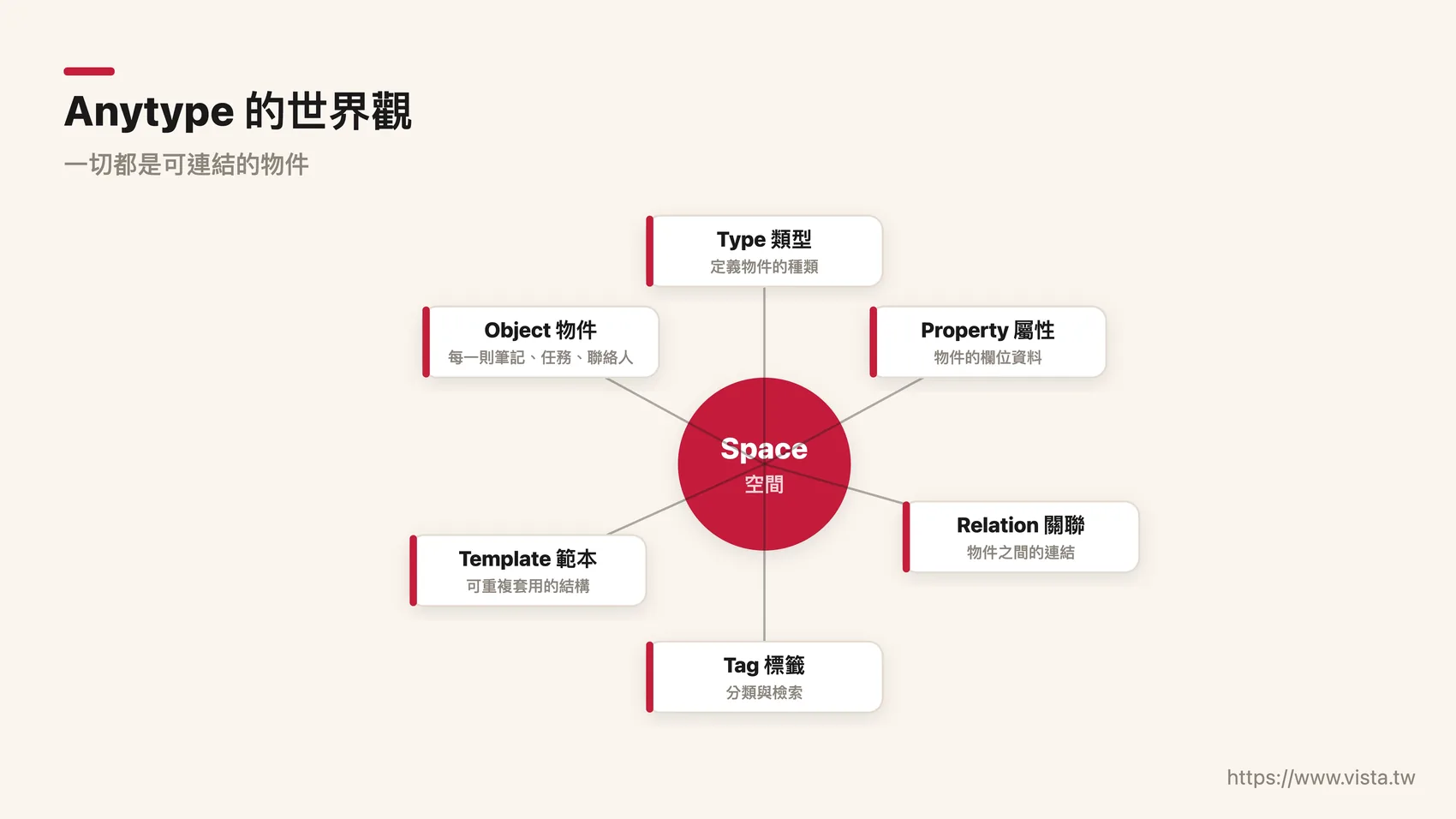 *▲ Anytype’s world view: local priority, default encryption, object-oriented - your notes are a personal database that can be connected to each other. *
**Second, what is MCP? ** The full name of MCP is Model Context Protocol (opens in a new tab) (Model Context Protocol), but you don’t need to remember this string of English. You just need to remember this metaphor: MCP is a translator and a bridge. Claude itself is very smart, but it cannot see Anytype in your computer; Anytype contains your notes, but it will not take the initiative to speak. The job of MCP is to build a bridge between the two, allowing Claude to query, organize, and even write your notes using conversations you can understand.
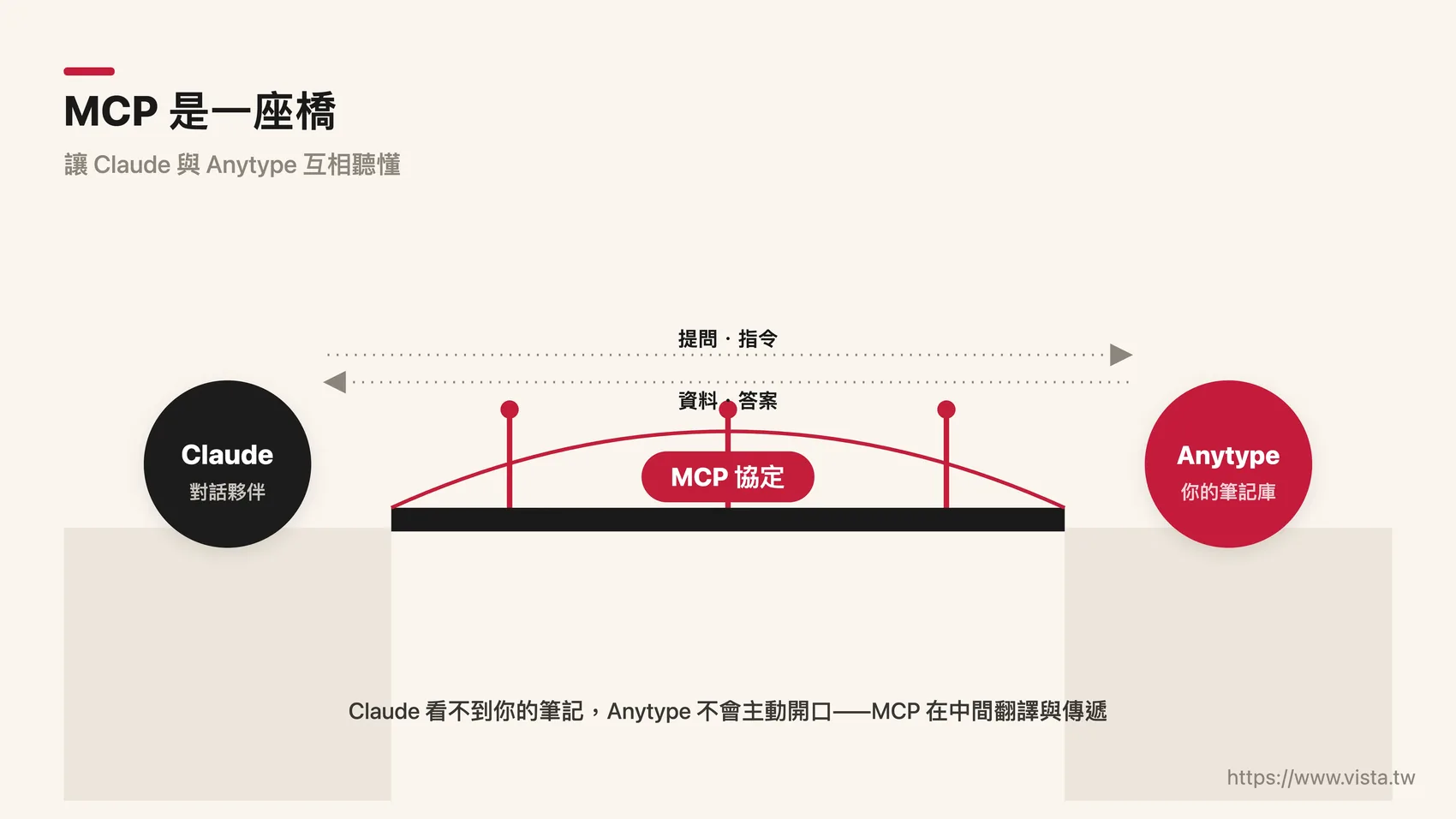 *▲ MCP is like a translator and bridge, setting up a channel for dialogue between the smart Claude and the silent Anytype. *
**Third, what will happen after being strung together? **This is the really exciting part. In the past, your notes were a passive warehouse—throw things in and slowly rummage through them when you need them. After being connected, it becomes an active partner - you only need to say a word to Claude, and it will find the materials scattered everywhere for you, organize them, and even directly write a first draft. From storage to dialogue, this is the most fascinating qualitative change in knowledge management in the AI era.
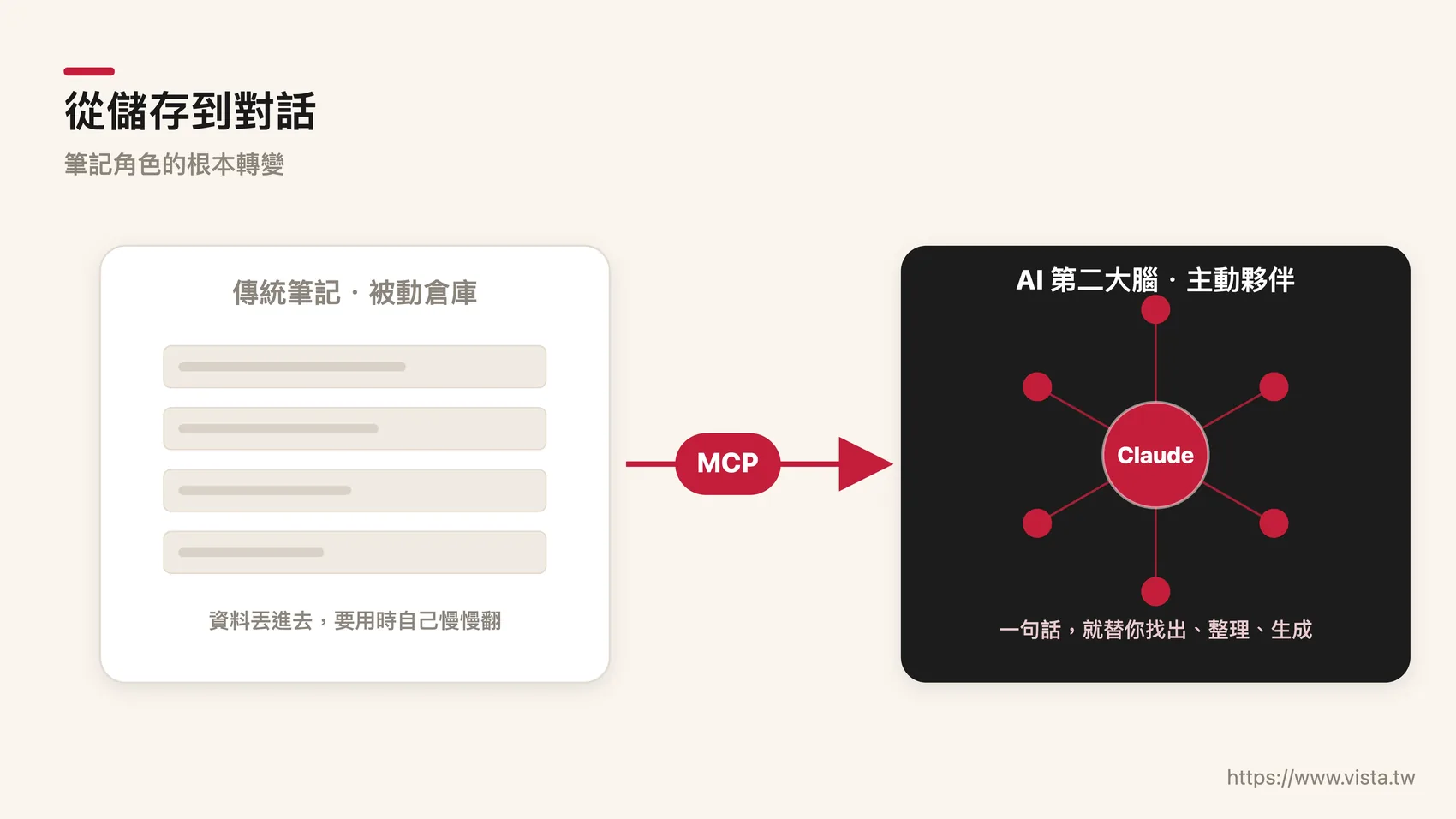 *▲ From storage to conversation: Your notes are no longer a passive warehouse, but an active partner that responds to you. *
Step-by-step installation: Four steps to connect Claude to Anytype
Okay, now that the concepts are out of the way, let’s get started! There are actually only four steps in the whole process, so take your time and don’t be nervous.
Preliminary homework: prepare three things first
Before you start, make sure you have these three things on your computer. The first is Claude Desktop (opens in a new tab) (Claude Desktop), which is the window we want to use for dialogue; if you have an engineering background and are accustomed to operating with instructions, you can also choose Claude Code (extended reading: Introduction to Claude Code for knowledge workers). The second is Node.js (opens in a new tab), which is the underlying environment that allows the MCP server to operate smoothly. You can download and install it from the official website. Just click Next during the process. The third, of course, is the Anytype desktop version. Please go to Anytype official website (opens in a new tab) to download and complete the registration.
There is a crucial and most overlooked detail here: **Anytype desktop version must remain open. ** Because MCP communicates with Anytype through your computer’s local port (the default is 127.0.0.1’s 31009 port). Once you turn off Anytype, the other end of the bridge disappears and Claude can’t read anything.
Step 1: Generate your API key in Anytype
Open Anytype, click on “App Settings”, find the API Keys section, and click Create new to create a new key. The system will generate a set of keys that are unique to you - you can think of it as a key. In the future, Claude will use this key to open your note library. Please copy it first and temporarily paste it in a safe place for later use.
(Tips: After creating the key, Anytype will usually thoughtfully provide a configuration file with “the key already filled in”, which you can directly copy and use, saving you the trouble of manually replacing it.)
Step 2: Fill in the key into Claude’s settings
Next, it depends on which Claude you use.
If you are using the Claude desktop version, please open its MCP configuration file, paste the following settings, and replace <YOUR_API_KEY> with the key you just copied:
{
  "mcpServers": {
    "anytype": {
      "command": "npx",
      "args": ["-y", "@anyproto/anytype-mcp"],
      "env": {
        "OPENAPI_MCP_HEADERS": "{\"Authorization\":\"Bearer <YOUR_API_KEY>\", \"Anytype-Version\":\"2025-11-08\"}"
      }
    }
  }
}
If you are used to using Claude Code, it is even easier. Open the terminal and paste this line of instructions (also remember to replace the key):
claude mcp add anytype -e OPENAPI_MCP_HEADERS='{"Authorization":"Bearer <YOUR_API_KEY>", "Anytype-Version":"2025-11-08"}' -s user -- npx -y @anyproto/anytype-mcpThat Anytype-Version is the version mark of the API, just fill it in without going into details.
Step 3: Restart Claude and complete the connection
After setting up the archive, close Claude completely and reopen it. When first launched, it will automatically download and install Anytype’s MCP server in the background, which may take a few seconds.
Step 4: Verify that it is really connected
Finally, do a simple test. Enter a sentence in Claude: “Please list all the Spaces in my Anytype.” If it correctly returns your space list, congratulations - the bridge has been built, and your second brain is officially online.
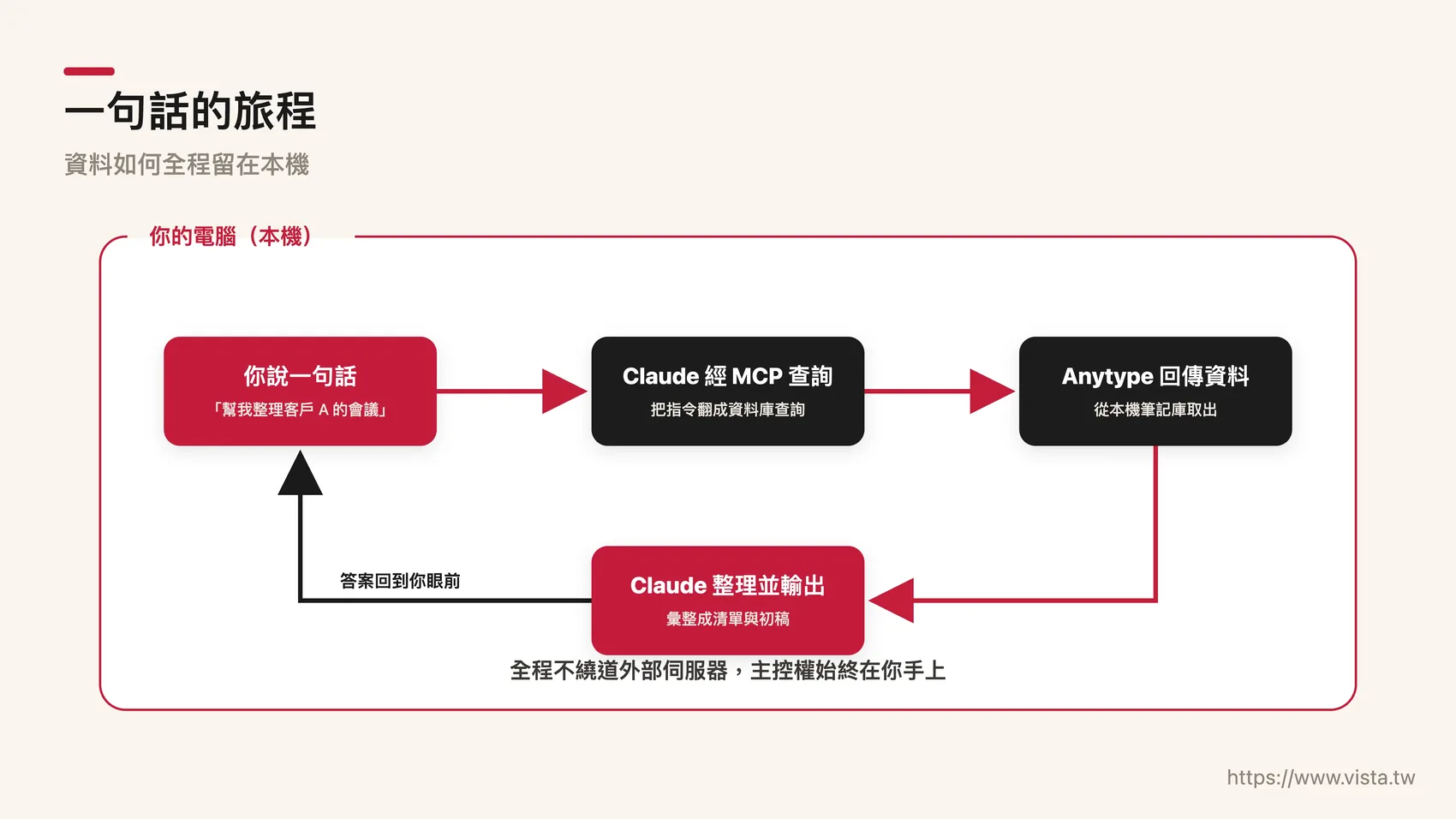 *▲ The journey of a sentence: The sentence you speak will pass through Claude, cross the MCP bridge, and finally reach the notes in Anytype. *
A safety reminder worth spending thirty seconds to read
I know that privacy is the most important thing for many office workers, so I would like to explain why this structure is relatively safe. The entire communication process occurs on your own computer, and the data will not bypass any external servers; your API key will not be hard-coded in the configuration file for long-term storage, but will be read into the memory for use when the server is started. In other words, you always have control over your note library. Of course, please keep the key itself properly and do not give it to others at will. This is basic digital literacy.

🛰️ Want someone to accompany you to see clearly in the wave of AI changes?
Almost all the public articles you see are finished products after repeated polishing. But what I cherish the most is the warm judgment before the finished product - this is the reason why I made Vista AI Inspiration Supply Station (opens in a new tab): a weekly thought note for fellow travelers in the AI era, sharing those Yoshimitsu Kataha that will not appear in official articles with you who are willing to get closer.
👉 Subscribe now and receive weekly emails → (opens in a new tab)
After Claude is connected to Anytype, how different can an office worker’s daily life become?
Connecting the systems together is just the starting point. The real value lies in what you use it for? Next, I want to use a few situations close to the workplace to let you concretely experience the power of this system. You will find that the focus is never on the tool itself, but how it saves you time, reduces anxiety, and magnifies judgment.
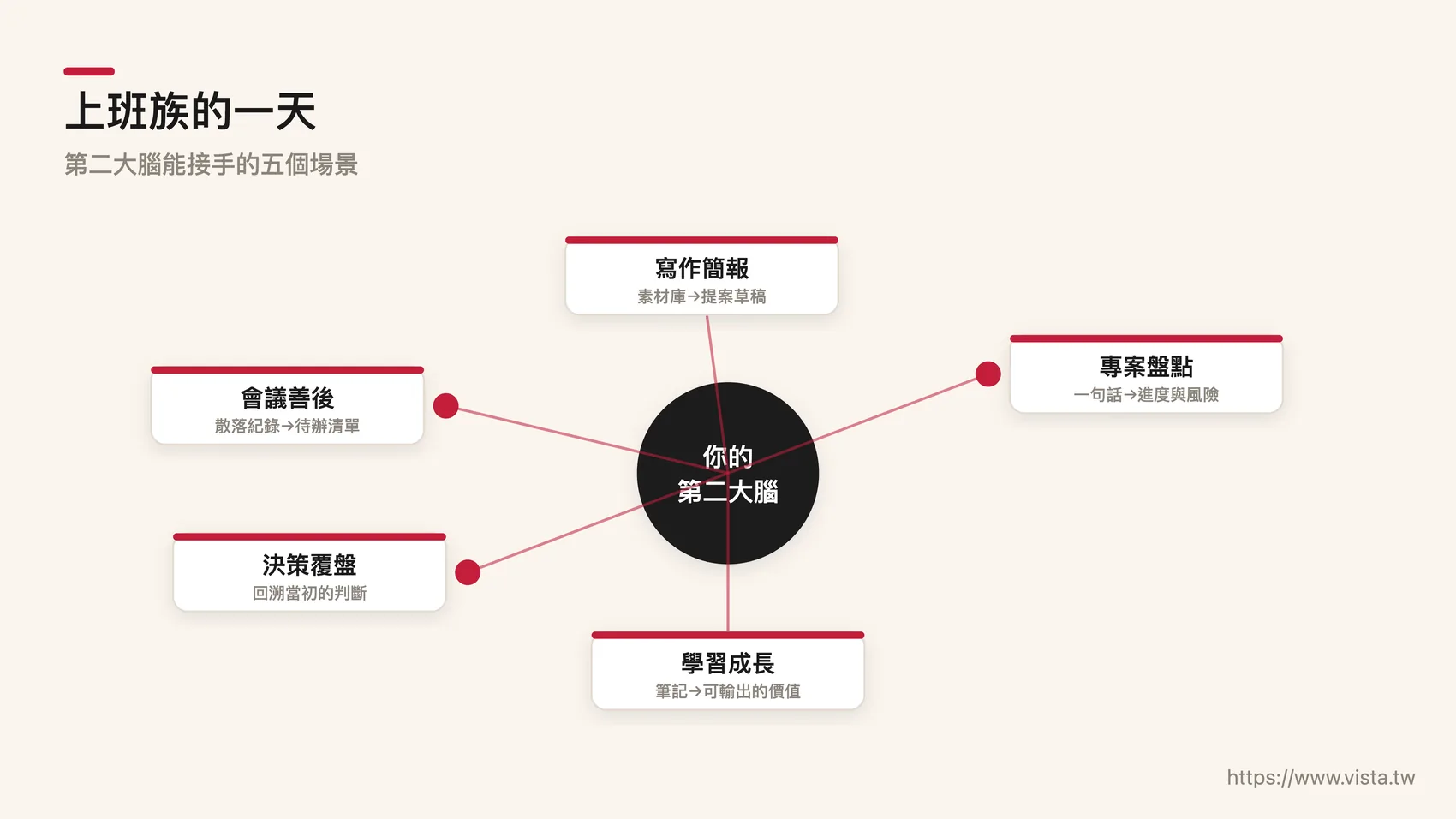 *▲ What an office worker who is chased by meetings, reports and messages needs most is not more tools, but a partner who can sort out his thoughts. *
**Scenario 1, the aftermath of the meeting is no longer a nightmare. ** The most common pain point for office workers is that meeting notes are scattered everywhere - this time they were written in object A, and last time they were written in object B. When it comes time to report the progress, they can’t be put together at all. Now you can just say: “Please help me organize the minutes of the past three meetings between me and Client A, list the items that are still pending, and mark those that are overdue.” Claude will span multiple notes for you and compile them into a clear to-do list. What originally took half an hour to search for can be done in just a few sentences.
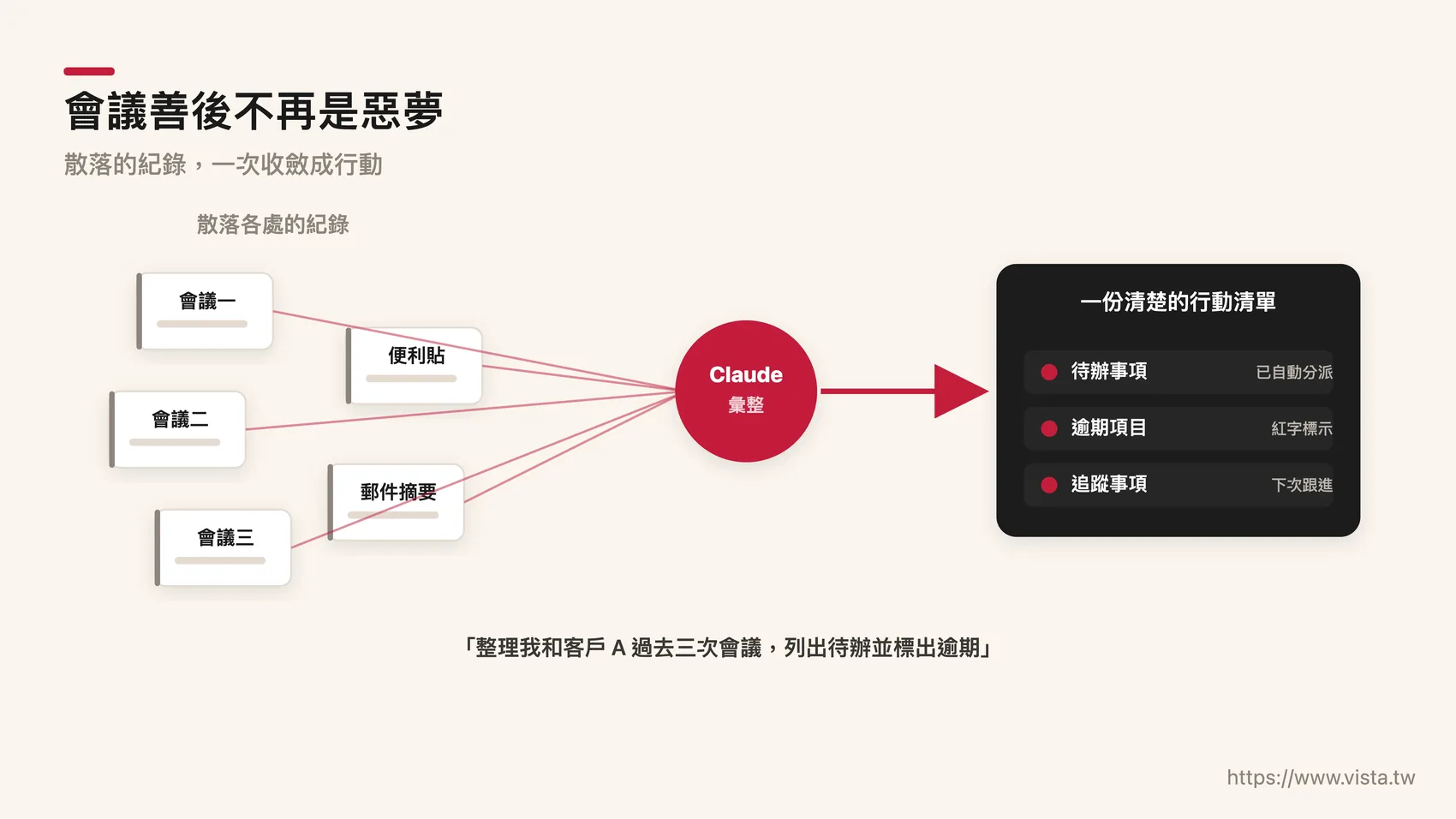 *▲ Meeting aftermath is no longer a nightmare: the to-do items that originally took half an hour to rummage through can now be compiled in just a few sentences. *
**Scenario 2, writing and presentation, generate a draft directly from the material library. ** The inspirations you usually jot down, the key points of articles you read, and feedback from customers are actually valuable writing materials, but they used to sleep deep in your notes. Now you can say: “Please help me draft an outline of an internal proposal to my supervisor based on all the notes about “remote management” in my Anytype.” Claude will reweave your past thoughts into a structured draft. It is not an AI eight-legged essay generated out of thin air, but grows on your own material - this is the biggest difference between it and general AI writing (if you want to see a more complete AI writing flow, please refer to my Writing Workflow Combined with MCP). **Scenario 3: Project progress can be reviewed in one sentence. ** For people who need to manage multiple cases at the same time, “Where are we going now?” is often the most nerve-wracking question. You can ask: “Among the notes related to the “Annual Marketing Project” in my hand, which ones were added this week? What risks are currently unmeasured?” Let Claude do a real-time inventory for you, and you can leave your brain power to the links that really require decision-making.
**Scenario 4: Review decisions, let the past you remind you of the present. ** This is a usage that I personally cherish. We often forget why we made a decision in the first place. You can say to Claude: “Please find my judgment record about “should I take this case” half a year ago, and help me compare the differences between my considerations at that time and the current situation.” When your notes can be reviewed and compared, the chance of making the same mistake will be reduced. This is the moment when knowledge compound interest really starts to happen.
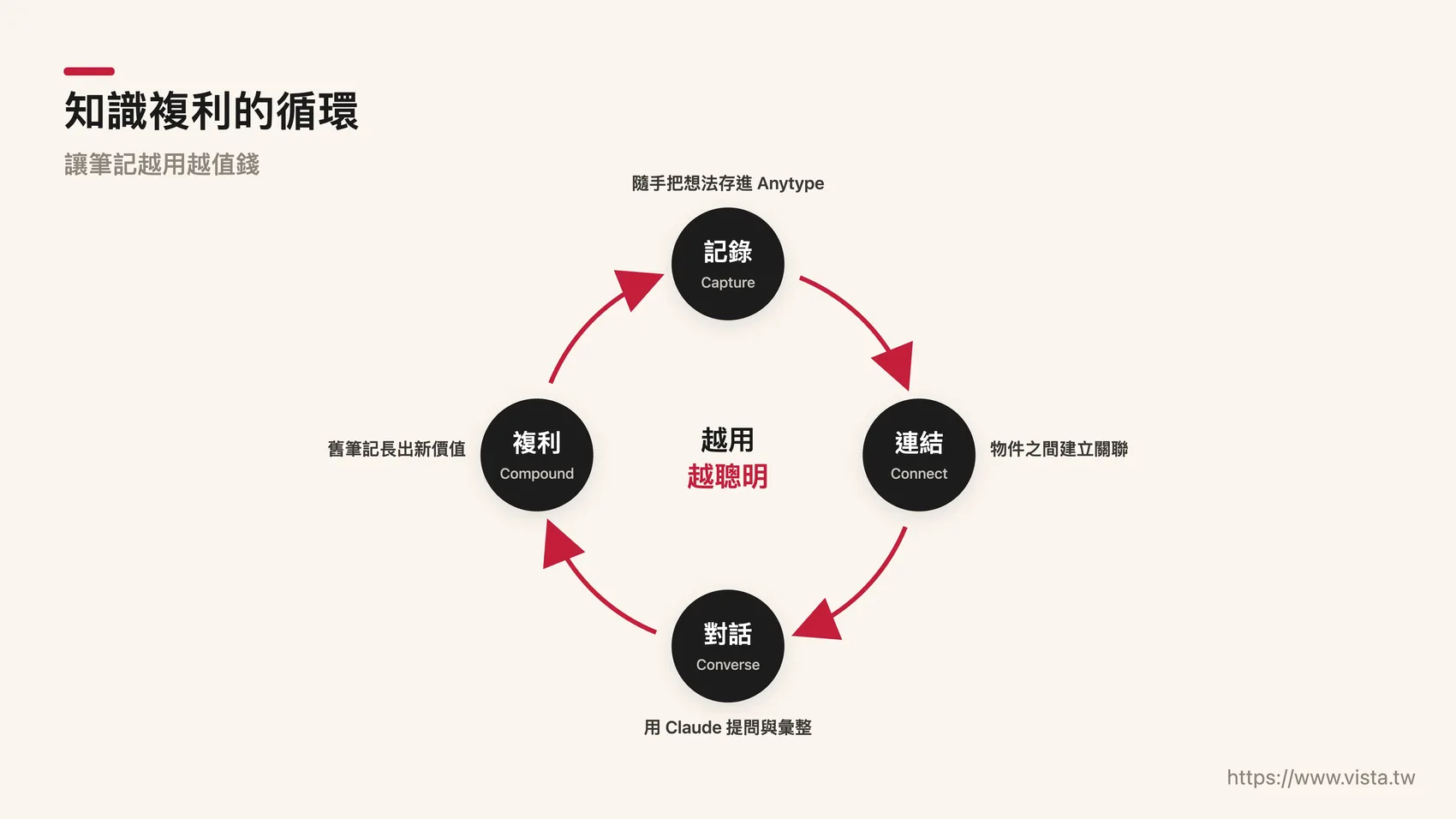 *▲ The cycle of knowledge compound interest: When past judgments can be reviewed and compared, every decision you make will stand on the shoulders of the previous one. *
**Scenario 5, learning and growing, really using what you have read. ** Many people read a lot of books, take a lot of classes, and take a lot of notes, but they never use them properly. You can say: “Please find the three most suitable topics for the next internal team training from my reading notes in the past three months.” In an instant, those lying notes are transformed into value that can be output to the outside world.
Written at the end: Tools are dead, thinking is alive
I would like to end this article with a principle that I have believed in for a long time - “Man and machine are 70/70”. In this system, AI is responsible for the 70% it is good at: retrieval, collection, first draft and comparison; and you must firmly guard the critical 30%: deciding to ask the right questions, judging the quality of the answers, and making the final choice. Claude’s connection to Anytype has never been to replace your thinking, but to liberate you from the labor of searching for information, giving you the freedom to do things that only humans can do.
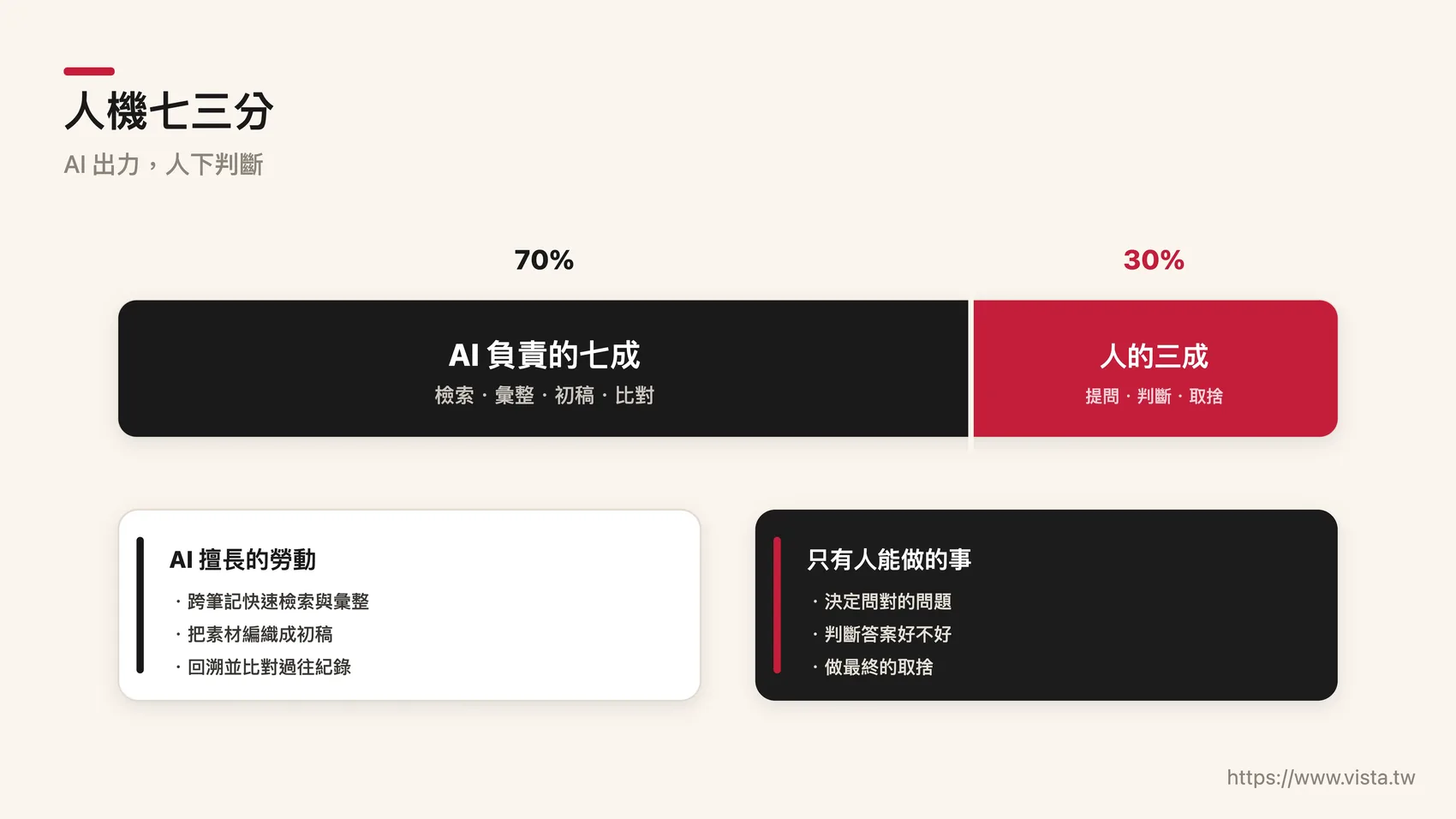 *▲ Human-machine 70%: AI is responsible for the 70% of retrieval, compilation, first draft and comparison, and you keep the 30% for asking the right questions, judging the good and bad, and making the final choice. *
When your second brain no longer just sits quietly on the hard drive, but begins to understand you, respond to you, and even complete the next step for you - you will find that you have not just changed a tool, but a new way of working. I hope this guide can be a bridge for you to take the first step.
If you want to know more about the implementation of AI workflow, second brain and content strategy, please visit my personal website: https://www.vista.tw
Next step
Bring this topic to your team
Vista Cheng speaks and runs workshops on AI workflows, writing and content systems for companies, schools and public agencies.