After ten months of self-taught Vibe Coding, I completed 52 projects

This article was originally published in “Vista Newsletter (opens in a new tab)” No.155
Hello, hello!
It’s November, and there are only two months left in this year. Every year at this time, I will do an annual review for myself. What I want to review first this year is something that started in January and has not stopped until now: self-study Vibe Coding.
Vibe Coding (opens in a new tab) You may have heard this term many times. To put it simply, you use natural language to tell the AI what you want to do, let the AI write the program, and you are responsible for judging whether the created thing is correct and useful. When I started making things seriously with Claude Code at the beginning of the year, all I thought about was: reorganize my official website first. Unexpectedly, after working all the way, I accumulated 52 projects in ten months, wrote a book (opens in a new tab), and also created a Seven-day Challenge Camp (opens in a new tab).
In this e-newsletter, I want to share with you the progress of this year: what websites and works I have made, what changes they have brought, and whether I have made any money. I also drew five pictures so that you can understand the whole picture at a glance.
Ten months, starting from an official website
Well, let’s look at the timeline first.
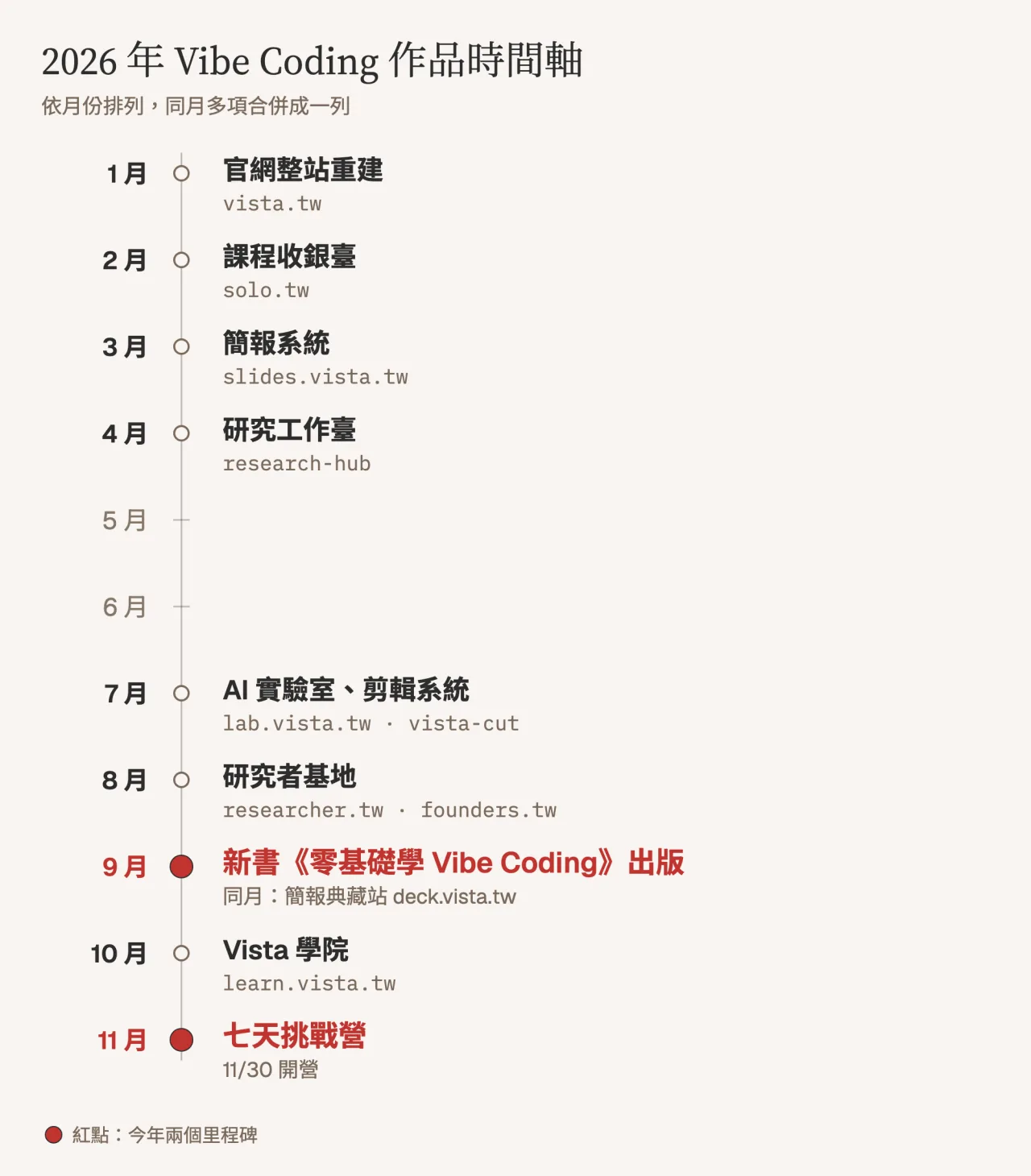
In January, the first thing I did was rebuild the entire vista.tw site. This website has been with me for many years. This time I talked to AI myself and moved all the articles, courses and book pages to the new website structure.
In February, a course system was built, and registration, card swiping, and confirmation letters were all completed through this mechanism. I did slides.vista.tw (opens in a new tab) in March. From then on, the presentations in my classes were all web pages. Students can view them by opening the URL without having to upload files. I started working on a research workbench in April, turning my own process of reading papers and organizing literature into a tool.
By July, things suddenly accelerated. That month I started 18 new projects at once, including lab.vista.tw (opens in a new tab), an AI laboratory, a video editing system, and several themed websites such as builder.tw (opens in a new tab). In August, I built researcher.tw (opens in a new tab), which is now a researcher base that is widely loved by graduate students.
September is the most important month of this year: the new book “Zero Basics Vibe Coding (opens in a new tab)” was published, and in the same month I also launched the deck.vista.tw (opens in a new tab) briefing collection station. In October, the original course website was revised and the URL was moved to learn.vista.tw (opens in a new tab). At the end of November, the first phase of Seven-Day Challenge Camp (opens in a new tab) will start.
6,864 saves, how did it come about?
Engineers have a habit: every time they complete a small modification, they save a file, called commit. This record is very honest. You will know in which month you actually took action.
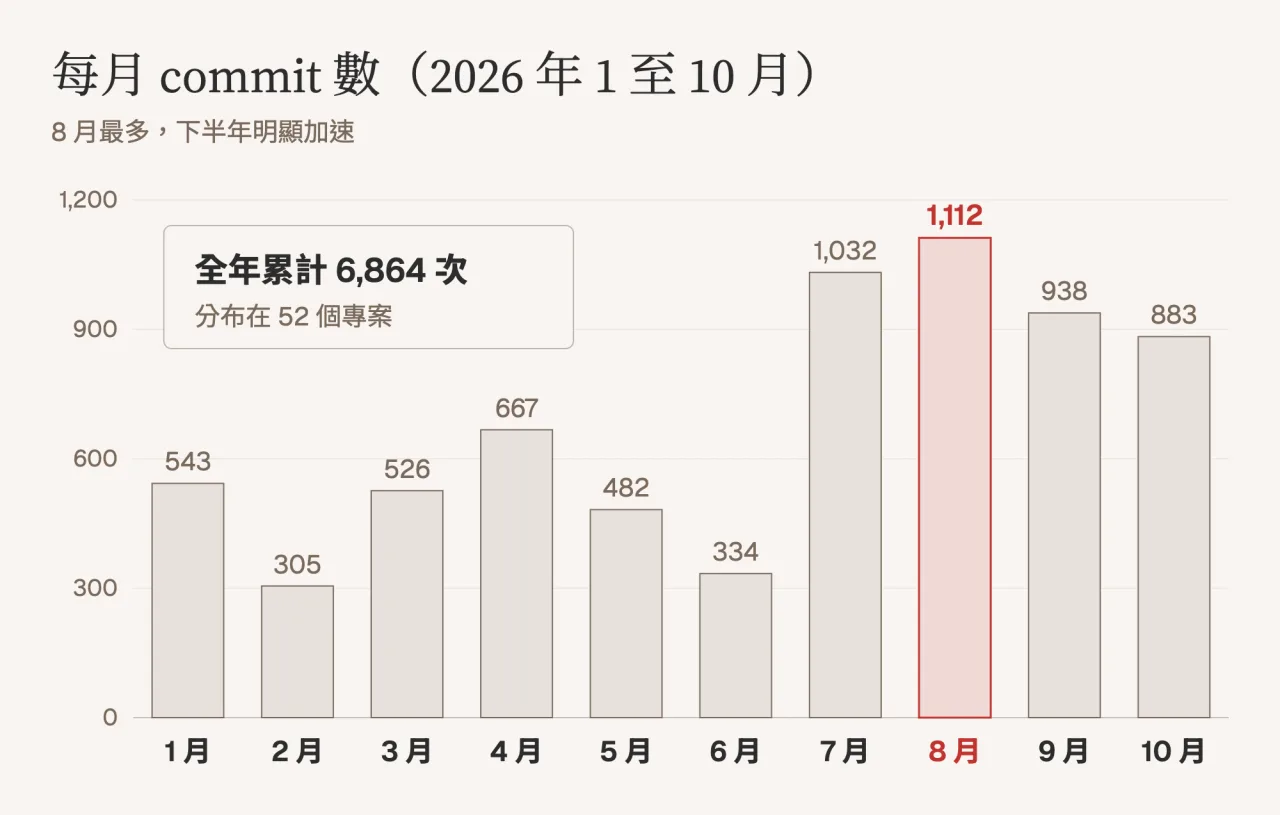
From January to now, I have saved a total of 6,864 times in 52 projects. In the first half of the year, there were about 300 to 600 times a month. In July, it suddenly jumped to more than 1,000 times. August was the highest peak, 1,112 times.
I will jump on it in July because I changed my approach. In the first half of the year, I mostly only worked on one project at a time; in July, I started letting AI handle several projects at the same time, while I checked back and forth and made judgments. My role gradually changed from a do-it-yourself person to a person who issues and accepts contracts.
However, I also want to remind you that the number of commits only represents the frequency of doing it, not how well it is done. Some projects were saved hundreds of times and finally stopped. This point will be discussed later when we talk about benefits.
52 projects, what exactly have been done?
Classifying these 52 projects according to their uses is roughly as follows:
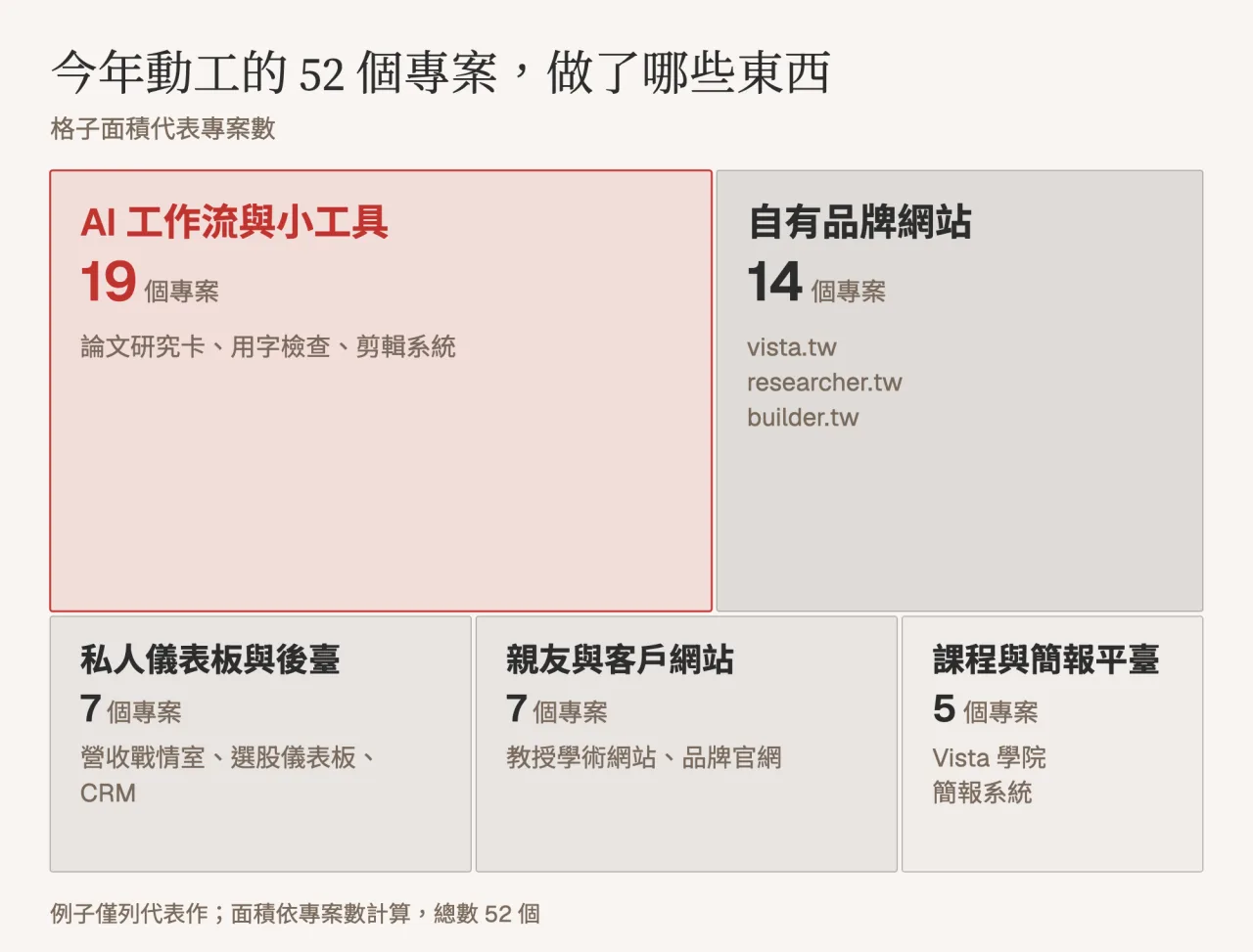
The largest piece is 19 AI workflows and gadgets. This was something I didn’t expect at all. For example, research cards help graduate students organize their papers, word checking tools to check whether there are inappropriate terms in articles, and a system to automatically edit recorded courses. Most of them don’t have beautiful interfaces, but they save me time every day.
The second block is 14 self-branded websites, from vista.tw, researcher.tw to builder.tw, each website corresponds to a different group of readers.
The third block is 7 private dashboards and backend. These websites are only visible to me, such as the revenue and traffic situation room that is automatically updated every day, the CRM that organizes customer transactions, and the page that tracks advertising effectiveness. In the past, this information was scattered on five or six platforms, but now you can see it by opening a website.
There are also 7 websites built for relatives, friends and clients, including a university professor’s personal academic website and several brand official websites. The last 5 are the Courses and Presentations platform, which is where I give my classes and collect my payments.
What abilities have I gained this year?
If I could only pick three things to say, I would say this.
First, the distance from idea to launch has become shorter. Nowadays, an idea can usually be made into a usable first version in a day or two, and can be given to a few friends to try out. If it doesn’t work, it will be modified. If no one wants it, it will be discarded. The cost of letting go is very low, so I am more willing to try.
Second, I learned to make my needs clear. The hardest part of Vibe Coding is actually not the program, but whether you can clearly explain what you want: who will use it, what problem it will solve, and how far it will be considered complete. This ability has helped me a lot. Writing course plans, writing proposals, and holding meetings with clients have all become more organized.
Third, I can build a store myself that will operate. From the registration page, checkout, mailing, list segmentation to performance tracking, these things that used to require several paid services and someone to maintain them are now mostly done by me. This allows me to launch new products much faster.
Did you make any money?
This is a question that many friends ask me, and I want to answer it truthfully.
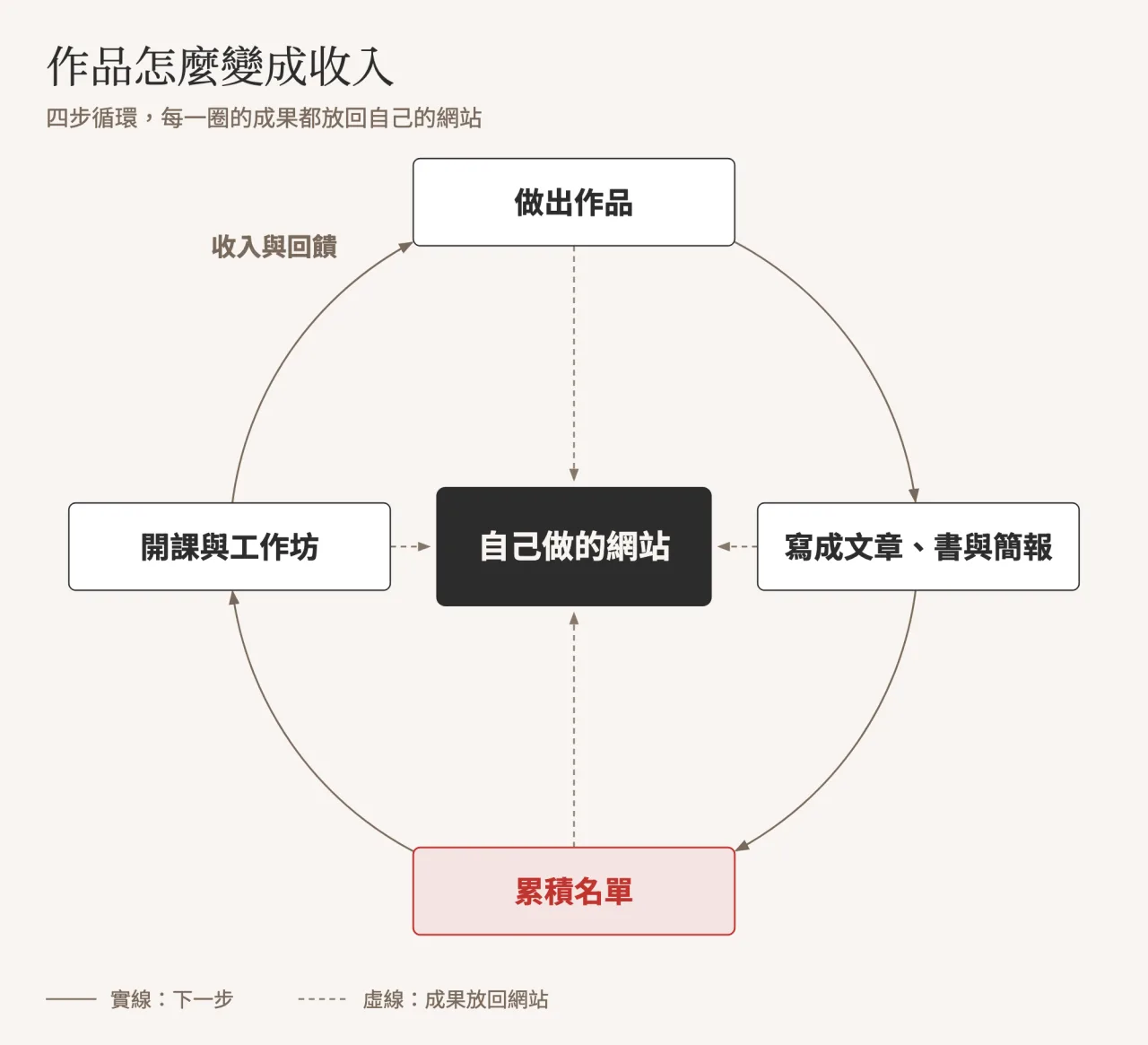
To be honest, among these 52 projects, there are very few websites that directly collect money from users. Most of the websites themselves don’t make money; their role is facade, cashier, and list entry. What really brings in income is the above cycle: I create works and write the process into articles, books, and newsletters; readers get to know me and leave emails; I then start classes and hold workshops, and the income and feedback from students allow me to continue working on the next work.
In numerical terms, this year’s self-operated income from courses, workshops and the annual transition plan is close to a quarter, of which online registration and payment are all done through the website I made myself. This does not include income from new book royalties, corporate training and speeches. The new book and many speech invitations are brought about by Vibe Coding.
However, I also want to share two lessons with you.
The first one is that doing it quickly does not mean that you can check less. This year I had two products that I spent a lot of time making. Only after they were put on the shelves did I realize they needed to be redesigned and had to stop selling them. Now when I make new things, I will run a few more rounds of checks before putting them online, and I will make sure that someone really needs them before I start.
The second is that the more websites there are, the heavier the maintenance burden will naturally be. Every website needs to be updated, checked, and occasionally broken. So in the second half of this year, I started to organize some repetitive things.
I wrote a book about the experiences I learned this year
“Zero Basics of Vibe Coding: Using AI to Make Websites, Apps, and Work Automation Tools (opens in a new tab)” published in September this year, is to organize this year’s experience into a path that even novices can follow.
There are 14 chapters in the book, starting from what Vibe Coding is and how to choose AI assistants and tools. Chapter 4 will take you through your first project: a to-do list app. Then talk about how to talk to AI, how to understand the program written by AI, and how to ask AI to fix the program when it makes an error. The second half of the book is practical, and I directly use the websites I built this year as examples: Chapter 8 uses vista.tw and solo.tw as examples to talk about how to build a website from scratch, Chapters 9 to 11 talk about list tools, sales pages, and data dashboards, and the last chapter talks about quality control and risks. This entire book does not assume that you can program.
If you want to see if it’s right for you first, you can try the full text of Chapters 1 and 4 for free.
- Free Trial Chapter 1
- Go to the blog to read “Learning Vibe Coding from Zero Basics” (opens in a new tab)
After reading the book, find someone to accompany you to create your first work
After reading a reference book, many people feel that they should be able to do it, but they never start.
This is normal. The most difficult part of self-study is never the method, but the lack of deadlines, no one to accompany you, and not knowing who to ask when you get stuck. So I designed a three-step path:
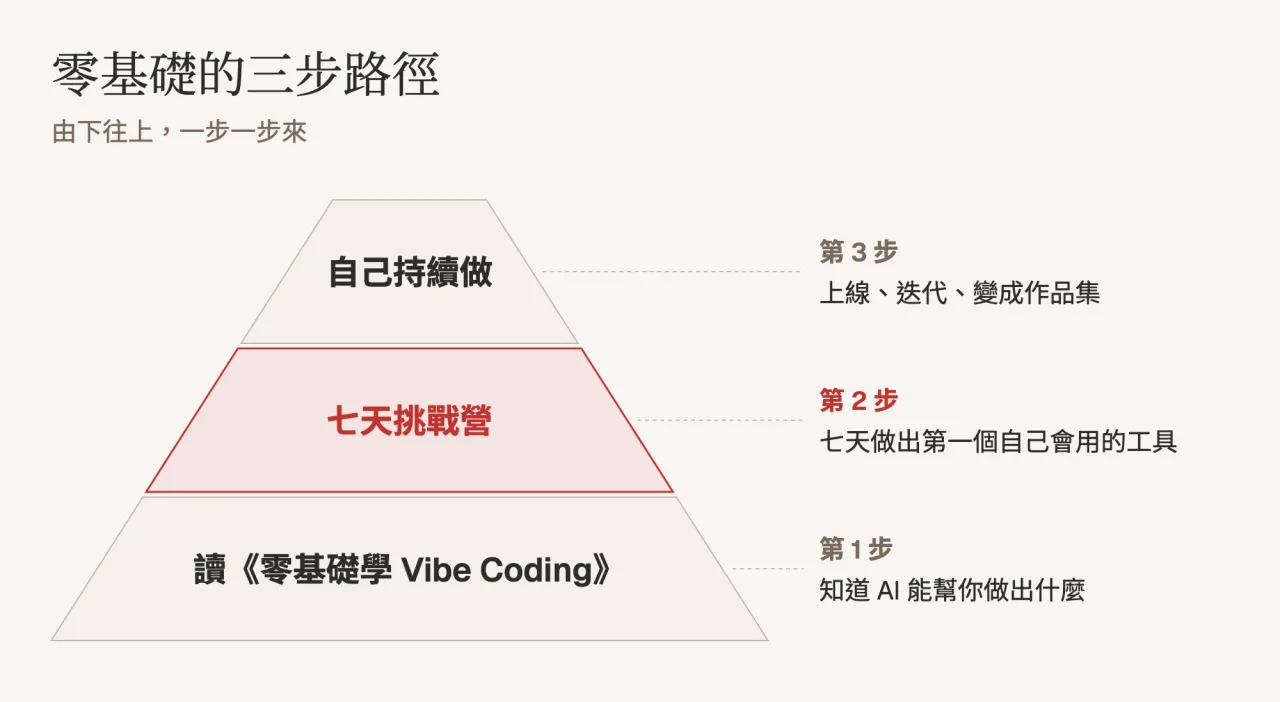
The first step is to read and understand what AI can do for you. The second step is the seven-day challenge camp I will hold at the end of this month: use seven days to make the first gadget that you will use every day. The third step is to leave it to you to continue working on it, put it online, modify it, and slowly accumulate it into a portfolio.
The seven-day challenge camp runs from November 30 to December 6. At 8 a.m. every day, you will receive a task letter and only do one thing every day:
- Day 1: Choose a tool you really know how to use and make a moving first version
- The next day: clarify the requirements and make a fully functional version
- The third day: Run a round with real information and fix the areas that are blocking you.
- Day 4: Make it work on mobile phones
- Day 5: Find someone to try it out and correct a problem based on feedback
- Day 6: Release and go online, get the public URL
- Day 7: Acceptance live broadcast and hand in your work
You can keep up with the web or app version of Claude without installing any software or knowing how to write a program. For those who are already using Claude Code, each task letter is also attached with the terminal method. During the challenge, there is a LINE learning group where you can discuss with each other. I will hold a live broadcast on the evening of December 6 to see everyone’s work together.
It needs to be reminded that although Claude’s free account can also be used, the quota is relatively tight. If you do it for seven consecutive days, you may hit the upper limit, so I recommend subscribing to Claude Pro for one month during the challenge.
The cost of the challenge camp is 999 yuan, and registration ends on November 28.
See the introduction and registration of the seven-day challenge camp (opens in a new tab)
Finally, I want to hear your thoughts
If you could make a gadget tomorrow, what would you most want to do? Is it organizing forms for keeping accounts at home, arranging reading plans for children, or reports that need to be repeated every week at work?
Feel free to leave a message and tell me directly. Your idea might be the best question on the first day of the challenge camp. If you have friends who have always wanted to learn Vibe Coding but haven’t started yet, you are welcome to share this article with them, or invite them to subscribe to the “Vista Newsletter (opens in a new tab)”.
See you next time!
Vista
Next step
Bring this topic to your team
Vista Cheng speaks and runs workshops on AI workflows, writing and content systems for companies, schools and public agencies.