I built more than 800 resources into an island that you can visit

✍️ This article is reposted from “Vista Newsletter” No.152, originally published in iamvista.substack.com (opens in a new tab). If you like this kind of content, welcome to free subscription to “Vista Newsletter” (opens in a new tab) and receive my observations and methods first-hand every week.
Hello, hello!
At about ten o’clock this Monday night, I opened Claude Code and talked to it about an idea that had been running around in my mind for a while: Can I turn the things I have scattered on various websites over the years into an island that can be visited?
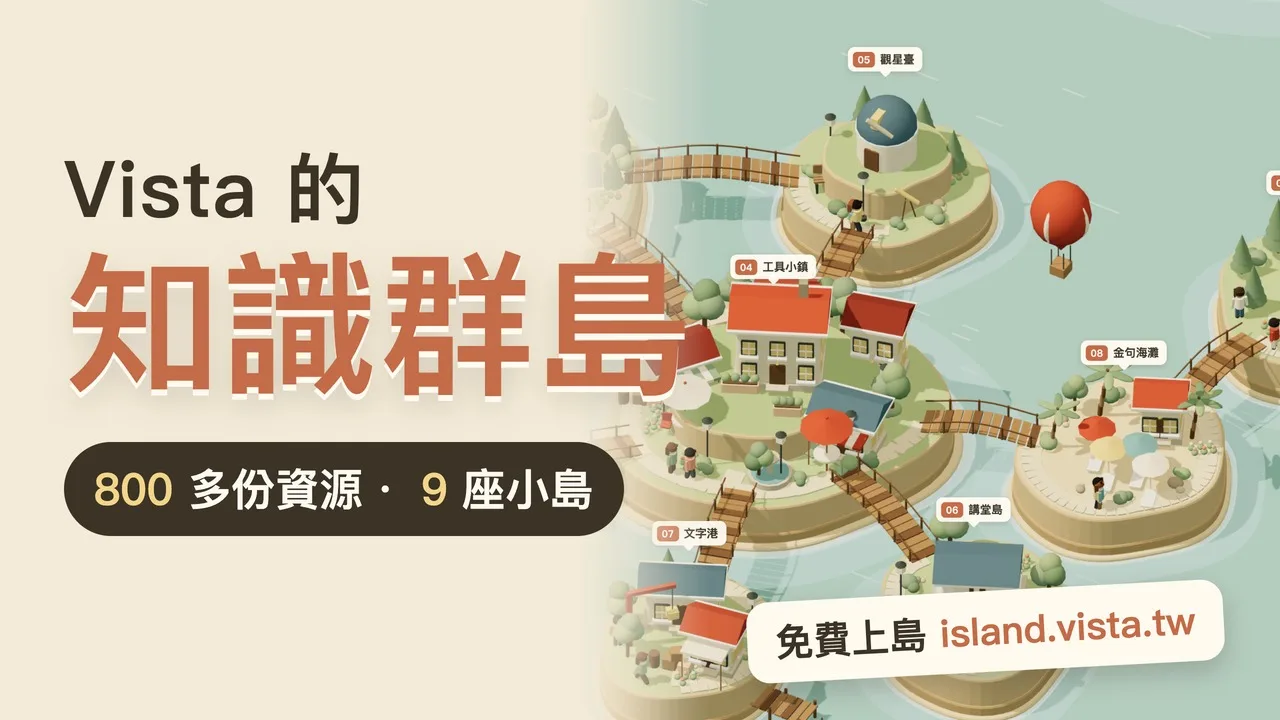
By the next morning, the virtual island was online. It’s called “Vista’s Knowledge Islands (opens in a new tab)” and the URL is island.vista.tw (opens in a new tab).
In this newsletter, I want to talk to you about how this island was built. On the one hand, I record another practical experience of Vibe Coding, on the other hand, I also want to encourage you: if you have accumulated some works, notes or resources on hand, you may be able to build a home for them.
Let’s go to the island first.
It is recommended that you click on island.vista.tw (opens in a new tab) first, spend two minutes browsing around, and then come back to read the following content, which will make you feel better.
After opening it, you will see nine low-polygon islands floating on the sea. You can use the mouse to drag and rotate, and the scroll wheel to zoom; on the mobile phone, you can also use your fingers to slide and pinch to zoom. There is a “night” button in the upper right corner. Press it and the entire sea will turn into a dark blue night sky.
You don’t need to register or leave an email first, just open it and you can browse!
As soon as you land, the little Vista people on the pier will greet you and ask you what you want to visit today. There are only four options: looking for help with thesis, wanting to bring AI into the classroom, wanting to make work easier, or just take a look first. After selecting it, click on an island and Vista will walk ahead and take you across the bridge.
Each of the nine islands has its own theme:
-
Research Lighthouse Island: There are seven floors in total, starting from the research life at the base of the tower, setting topics, finding and reading literature, all the way up to the stage in the lighthouse, oral examinations and submissions. Whichever level the graduate student is stuck on, go to that floor to find it.
-
Lecture Island: Collect my public courses and lecture notes at slides.vista.tw (opens in a new tab). Friends who are interested can browse them.
-
Tool Town: Most of the AI gadgets on lab.vista.tw (opens in a new tab) can be opened and used directly.
-Writing Port: Writing tips and checking tools, suitable for friends who want to write better articles.
-
Book Plank: From the first book published in 1995 to this year, each plank is a book.
-
Golden Sentence Beach: When I was reading, underlined sentences were placed in drift bottles, and I picked them up and read them casually.
-
Star observatory, distant islands, and Vista Pier where everyone disembarks.
All told, more than 800 resources were collected on the island. Among them, there are 479 golden sentences in Golden Sentence Beach, 236 essay resources in Research Lighthouse Island, and the others are tools, briefing notes, books and manuals.
When you are shopping, if you see something you like, you can click “Pack”. After shopping, give your luggage constellation a name and the night sky will light up, turning everything you put in into a star. Finally, you can copy the list, download it, or send it to your own mailbox. You can also make the zodiac sign into a sharing card and pass it to your friends.
Why build an island?
At this point, you may be curious: There is already a main website vista.tw, why do we need to build another website?
The reason is simple. I have written and produced a lot of things over the years, but they are scattered on more than a dozen websites: articles on vista.tw, paper resources on researcher.tw (opens in a new tab), gadgets on lab.vista.tw (opens in a new tab), presentations on deck.vista.tw (opens in a new tab), and several manuals on different sales pages. For me, everything knows where to put it; for my friends who are here for the first time, it’s like walking into a warehouse without a map.
A while ago, I saw a friend organizing his works into a small island that you can visit. I thought it was very cute and inspiring. But I also want to do a few more things:
First, I won’t read it all in one glance. So these islands will continue to grow.
Second, you should be able to take something with you after shopping. I hope that when visitors leave, they don’t just feel “so cute”, but they actually have a few more useful resources in their hands. The luggage and mailbox functions are designed for this purpose.
Third, you should see changes next time you come. The island will remember your zodiac sign; I wrote new articles and made new tools, and new drift bottles and new lights will appear on the island.
These three points later became the first chapter in the design document.
One night, how did I cover it up?
When many people hear about 3D websites, their first reaction is: Doesn’t it take engineers who know programming well to make it?
To be honest, two years ago, I wouldn’t have dared to even think about it. This time, from the start of the project to the launch, what I did was actually very similar to writing a long article. I have organized the process into five steps for your reference.

1. Take stock first, then take action
Before building the island, I first asked AI to help me take stock of the resources of each website: which ones are free, which ones require email, which ones are paid, and which ones have been discontinued.
This step is very important. After taking stock, I discovered that graduate students have the richest resources, teachers have relatively few resources, and office workers’ resources are scattered on several websites. This directly affects how the island is divided and which island is opened first. In addition, products that have been discontinued, pages that require passwords, and student areas were also decided not to be put on the island at this step.
2. Make it clear “what you don’t want”
When I discuss design with AI, what I spend the most time talking about is the things I don’t want.
For example, I don’t want visitors to be asked “Where are you stuck?” as soon as they land. It feels like a medical visit, which is not polite. Therefore, the Vista avatar on the pier only greets visitors and asks you what you want to visit today; more in-depth questions cannot be asked until you enter the lighthouse or workshop in that context.
I also don’t want visitors to be asked to leave their email before they can take something away. Therefore, the packing list can be copied and downloaded directly, and sending a letter is only one of the options.
After these “don’ts” are written into the design document, AI can refer back to it every time it makes a decision. This is much more useful than just saying “help me make a good-looking website”.
3. Make a small sample first, and then cover it after reading it
I didn’t ask AI to build an entire archipelago from the beginning, but first asked it to make a small island that could be dragged and rotated, with both day and night states. I looked at it and felt that it was in the right direction, so I continued on.
The original idea was to have the texture of a paper-carved three-dimensional book, like an open book, with the terrain made of layers of paper. Later, after it was actually made, I changed it to the low polygon toy style now. If you only realize that the style needs to be changed after building nine islands from the beginning, you will have to start over a lot. Make a sample first, that is, use the minimum cost to confirm that the direction is right.
4. Let AI write the program and I will be responsible for making judgments
The programming part is left to Claude Code. It uses three.js, a set of web 3D drawing tools, and is built with Vite and deployed to Cloudflare Pages. You don’t need to memorize these terms, and I don’t understand every detail myself.
Where I spend my time is by always trying it out from the position of a visitor. For example, the sharing page cannot be scrolled originally, the color of the button that has been packed into the bag is too dark to be seen clearly, and the publishing year of two books on the writing bridge is wrong. These are all things I discovered while browsing and asked AI to correct them. From the start of construction to dawn, this project has accumulated more than thirty modification records, most of which were adjusting such details.
I also checked the resource figures on the island several times. It was originally written as “nearly 800 copies”, but after actual calculation, it was 814 copies, and finally changed to a more accurate “more than 800 copies”. AI is very good at doing things, but you still have to check whether the numbers are correct and whether the words will be misunderstood.
5. After going online, let it grow on its own
The island is built, and the last thing I want to do is to have to manually run to the island to refill a drift bottle every time I write a new article.
So I asked AI to set a weekly schedule: every Monday morning at five o’clock, the computer will automatically grab the latest articles from vista.tw, researcher.tw, writers.tw, builder.tw, as well as new tools from lab.vista.tw, re-build, test, and then deploy them online. Stop if any step goes wrong, and the broken version will not be pushed up.
In other words, this island will grow with my writing process. When you visit again next month, you should see some things you didn’t see this time.
It’s up to you to try it out
Having said all this, what I want to tell you most is: you can do this.
You don’t have to imitate me and build a 3D archipelago immediately. If you are a teacher, you can organize the textbooks over the years into a resource center classified by units; if you are a graduate student, you can make a filterable map of the literature you have read; if you run a community, you can collect good articles scattered on various platforms into a collection of your own.
The focus is not on technology, but on whether you are willing to think clearly about what you have in your hands, who you want to see, and what you want the other party to take away.
If you don’t know how to speak, you can try saying this to the AI:
I am (your identity) and have accumulated (your works or resources, such as fifty articles, three briefings, and ten commonly used tools) over the years. I want to make a web page so that (your readers) can quickly find things that are useful to them, and collect the ones they like and take them away. Please don’t write the program first. Please ask me five questions to help me clarify my needs, and then propose two different design directions for me to choose.
Please pay attention to the last sentence: ask questions first, give direction first, don’t rush to write programs. This is the opening I use in every project. It forces you to clarify vague ideas and prevents the AI from running in the wrong direction from the beginning.
After making the first version, I started using it and making changes. It doesn’t matter that the first version is ugly. My archipelago started with a small island and then slowly grew into nine islands.
By the way, I saw that Teacher A Liang also provided [Island Building Program] Website Generator (opens in a new tab). Friends who are interested can also try it!
If you want to learn systematically, you can start from this book
If you feel excited after reading it but don’t know where to start, I would like to recommend my new book “Zero Basics of Vibe Coding: Use AI to Make Websites, Apps and Work Automation Tools (opens in a new tab)”.
This is my 21st book, which was published by Qi Feng in September this year. It is written for friends who have never written a line of program but want to do something by themselves. The book starts with how to clarify your needs to AI, and takes you along the way to build websites, apps, and work automation tools, and finally deploy them online. The concepts used in building the island this time, such as clarifying the requirements first, making a prototype before expanding, letting AI write the program and making the own judgment, are all fully explained and practiced in the book.
You don’t need to become an engineer first. As long as you are willing to explain the ideas in your mind clearly, AI will accompany you to make it step by step.
Go to the blog to read “Learning Vibe Coding from Zero Basics” (opens in a new tab)
If you want to try reading first, you can currently read the full text of Chapter 1 and Chapter 4 for free on the website, as well as supporting briefings and extended articles: vista.tw/books/vibe-coding
Finally, please do me a favor
The island had just been built and there must still be many imperfections. If you find something stuck while browsing, something you can’t understand, or if you wish there were more resources on the island, please feel free to reply to me directly.
You are also welcome to share it with more friends after you finish shopping! At the same time, you are also welcome to send me your horoscope sharing card. I am very curious what names you would give to your zodiac signs. If you also make your own island, resource page or portfolio, let me know. Maybe, your work will be featured in the next e-newsletter.
See you next time!
Vista
📮 This article is reposted from “Vista Newsletter” No.152. The original text can be found at iamvista.substack.com/p/vista-no152-800 (opens in a new tab). If you like content like this, welcome to subscribe for free to the Vista Newsletter (opens in a new tab) and receive a helpful letter every week.
Next step
Bring this topic to your team
Vista Cheng speaks and runs workshops on AI workflows, writing and content systems for companies, schools and public agencies.